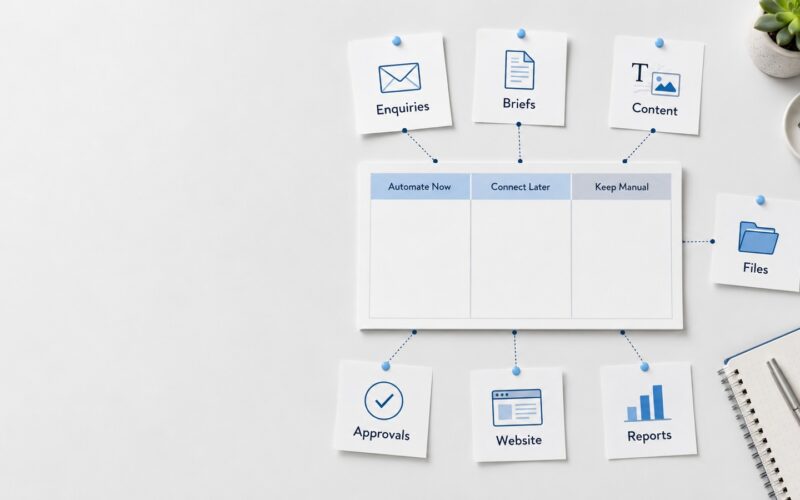
For many growing teams, content work does not fail because people lack ideas. It fails because the work is scattered. A campaign request starts in WhatsApp, the brief lives in an email thread, the design file sits in a shared folder, feedback is sent as screenshots, and the publishing date is tracked in a spreadsheet. Everyone is working, but the system is not helping.
A content operations platform brings those moving parts into one organised place. It gives teams a practical way to manage content requests, files, approvals, publishing tasks, and performance follow-ups without depending on memory or disconnected tools. For small businesses, marketing teams, creative departments, and service-based companies, this can make daily content production clearer, faster, and easier to control.
What is a content operations platform?
A content operations platform is a structured digital workspace for managing content from request to publication. It is not only a folder, task board, or calendar. It connects the full workflow: request intake, briefing, asset storage, production, review, approval, scheduling, publishing, and reporting.
In simple terms, it answers four daily questions for the team: what needs to be created, where are the files, who must approve it, and when does it go live?
This kind of content workflow system can be built using existing platforms, custom dashboards, automation tools, or a combination of business software. The important part is not the brand of tool. The important part is the structure behind it.
Why scattered content workflows slow teams down
Most content teams start with simple tools because they are easy. Email works for requests. WhatsApp works for quick updates. Spreadsheets work for lists. Shared folders work for storing files. The problem appears when the team grows, campaigns become more frequent, and approvals involve more people.
Common problems include duplicated briefs, missing attachments, outdated design versions, unclear approval status, forgotten publishing dates, and repeated questions about where things are saved. These issues are not just admin problems. They affect brand consistency, campaign timing, client service, and team confidence.
A strong content team platform reduces this friction by giving every piece of work a clear path.
The five core parts of a content operations platform
1. Request intake
Every content job should start in the same place. This could be a form, portal, dashboard, or internal request page. Instead of accepting vague messages from different channels, the team collects the key details upfront.
A useful content request management form should ask for the campaign name, target audience, content type, deadline, required platforms, key message, reference files, and approval contact. This prevents the production team from chasing basic information after work has already started.
2. Brief and task management
Once a request is submitted, it should become a trackable task. The team should be able to see the status, owner, due date, priority, and next action. A content workflow system can include simple stages such as new request, brief approved, in production, internal review, client review, final approved, scheduled, and published.
This is especially useful when one team is managing website content, social posts, campaign assets, newsletters, videos, photography, and brand updates at the same time.
3. File and asset organisation
A digital asset workflow is essential because content files multiply quickly. Logos, photos, videos, captions, design exports, source files, and thumbnails need a clear home. Without structure, teams waste time searching, re-downloading, or recreating files that already exist.
Use organised folders or asset libraries based on campaigns, clients, dates, platforms, and approval status. Separate working files from approved final assets. Add naming rules that make files easy to search, such as campaign name, asset type, version, and date.
4. Approval workflow
An approval workflow platform helps teams avoid confusion about what is ready and what still needs review. Instead of relying on scattered comments, every approval should be linked to the task and file being reviewed.
A simple approval flow may include content review, design review, brand review, management approval, and final publishing approval. Not every project needs all these steps, but the system should make it clear who signs off and what happens next.
This also creates a basic audit trail. When teams can see who approved what and when, there is less confusion if changes are requested later.
5. Publishing and reporting
The publishing workflow system should show where each asset will be used and when it will go live. This may include website pages, social channels, email campaigns, ads, internal announcements, or client portals.
After publishing, the same platform can store links, screenshots, performance notes, and lessons learned. This helps the team improve future campaigns instead of starting from zero every time.
A simple implementation framework
Building a content operations platform does not need to start with a complex system. Begin with the workflow before choosing the tool.
- Map the current process: Write down how content requests arrive, where files are stored, who reviews them, and how publishing is tracked.
- Identify the biggest delays: Look for repeated problems such as missing briefs, unclear ownership, approval bottlenecks, or file confusion.
- Define your ideal stages: Create a simple workflow from request to published, using plain language your team will understand.
- Standardise request forms: Make sure every new content job includes the information needed to start properly.
- Organise assets: Create a naming and folder structure for drafts, working files, approved files, and archived assets.
- Add automation carefully: Use reminders, status changes, notifications, and approval triggers where they reduce manual follow-up.
- Review and improve monthly: A platform should evolve with the team, not become another rigid admin burden.
What a good content operations platform should help you do
- Receive content requests in one structured place.
- Track every campaign, task, owner, and deadline.
- Store briefs, files, feedback, and approvals together.
- Reduce duplicated files and outdated versions.
- Show publishing status across different channels.
- Make approval steps visible and accountable.
- Help new team members understand the workflow quickly.
Where AI and automation fit
AI and automation can support content operations, but they should not replace the structure. A weak workflow with AI added on top is still a weak workflow. The useful approach is to automate repetitive steps after the process is clear.
For example, automation can send a notification when a request is submitted, move a task to review when files are uploaded, remind an approver before a deadline, or create a publishing checklist for each approved campaign. AI can assist with draft captions, content summaries, tagging assets, or turning a brief into production tasks. The team should still control quality, brand accuracy, and final approval.
Start with clarity, then build the system
A content operations platform is not only about software. It is about creating a reliable way for people, files, decisions, and deadlines to move together. When the workflow is visible, teams spend less time searching and more time producing useful content.
For businesses that manage regular campaigns, website updates, social media, photography, video, and brand assets, this kind of system can become a practical foundation for growth. Digivolve Media helps teams plan and build digital platforms, workflow systems, automation, websites, and content structures that support real daily operations without unnecessary complexity.