A campaign can look complete long before it is ready to launch. The visuals may be approved, captions may be polished, videos may be exported, and social posts may be scheduled. But if the links are not checked, landing pages are not aligned, tracking is missing, enquiry routes are unclear, and sales follow-up is not prepared, the campaign is still unfinished.
This is where a campaign handoff workflow becomes valuable. It gives creative teams, content leads, marketing managers, and studio operators a practical way to connect media output with IT setup and business action before anything goes live.
Recent developments in ecommerce, AI-assisted creative production, customer data platforms, reviews, performance marketing, and automation all point to the same reality: campaigns are no longer only creative outputs. They are connected business systems. A banner, video, email, landing page, booking form, WhatsApp link, CRM field, and follow-up task all need to work together if the campaign is expected to create measurable results.
Why campaign handoff often breaks
Many teams plan campaigns in stages. The creative team focuses on design,
, video, photography, and content variations. The web or IT team handles pages, forms, integrations, and tracking. The sales or operations team handles enquiries, calls, quotes, bookings, and customer follow-up.
The problem is not that these teams are doing the wrong work. The problem is that they often finish their parts separately. By launch day, someone discovers that the campaign link points to the wrong page, the enquiry form does not notify the right person, the CRM does not capture campaign source, or the sales team has no prepared response for new leads.
A strong campaign handoff workflow fixes this by making launch readiness visible. It creates one map that shows how each creative asset connects to a technical destination and a business outcome.
The campaign handoff map
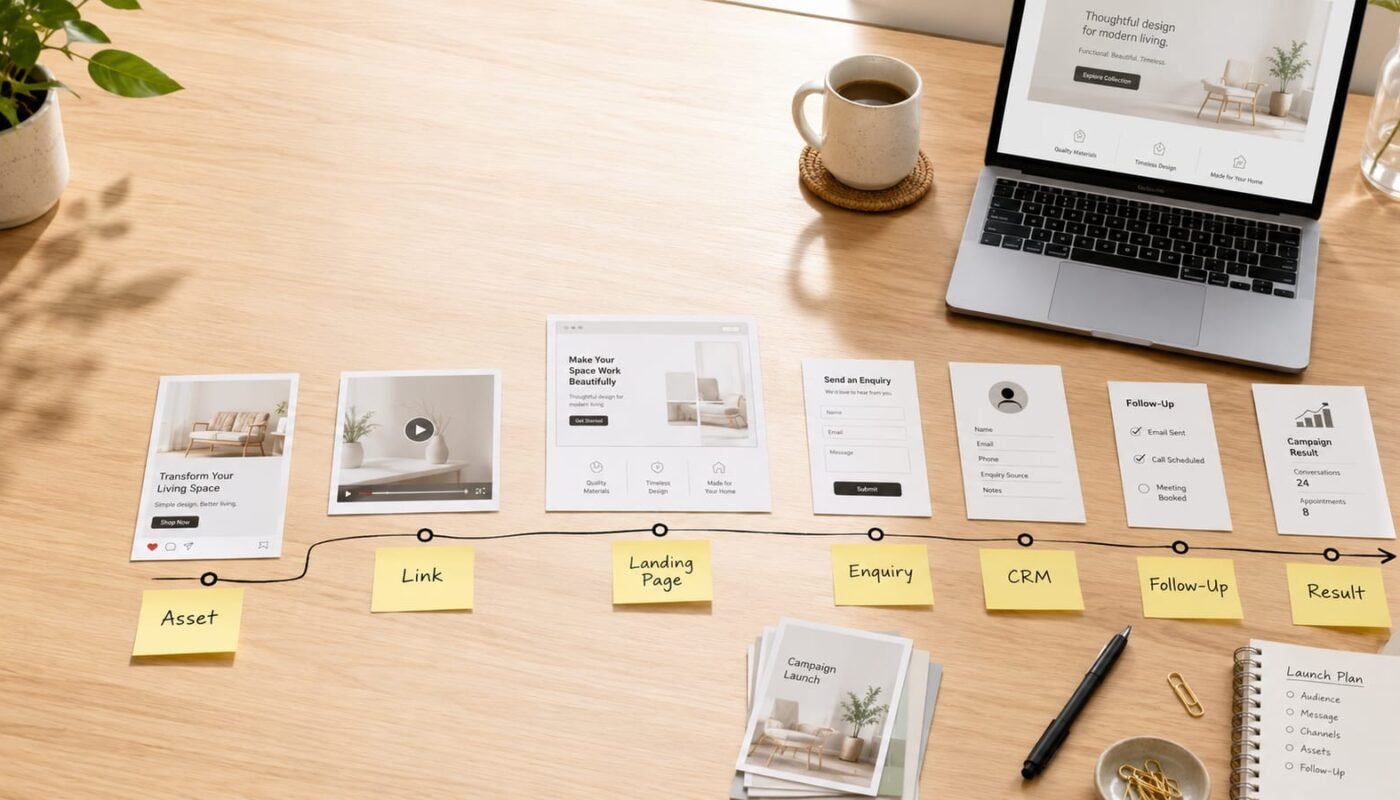
The simplest way to build the map is to move from left to right: asset, channel, link, destination, tracking, enquiry route, follow-up, and result. Each part should be confirmed before launch, not after the first problem appears.
- Asset: List every campaign item, including static posts, reels, videos, emails, ads, banners, website graphics, PDF downloads, product images, and message templates.
- Channel: Identify where each asset will appear, such as Instagram, Facebook, LinkedIn, Google Ads, email, WhatsApp, website hero section, landing page, or partner platform.
- Link: Assign the correct campaign link to each asset. This may be a landing page, booking page, product page, form, WhatsApp click link, file download, or payment route.
- Destination: Check that the page or route matches the promise made in the creative. If the post promotes a consultation, the page should not force users to search for the contact form.
- Tracking: Confirm campaign tracking setup, including UTM structure, conversion events, analytics goals, ad pixels, CRM source fields, or platform-specific reporting tags.
- Enquiry route: Decide where each lead goes. This could be email, CRM, WhatsApp, helpdesk, booking software, spreadsheet, or sales inbox.
- Follow-up: Prepare the next action. This may include an automated confirmation, a sales script, a quote request template, a callback task, or a nurture sequence.
- Result: Define the business outcome that matters, such as booked calls, product purchases, quote requests, downloads, demo requests, store visits, sign-ups, or qualified leads.
Build the workflow before the final creative export
A common mistake is to treat tracking and follow-up as final technical tasks. In practice, they should influence the campaign before the final artwork is exported. If the call to action is book a consultation, the landing page, form fields, automated email, CRM tag, and sales response should all support that action.
This matters even more as creative automation tools make it easier to produce many versions of banners, product visuals, videos, and social content. More output is useful only when each variation is connected to a clear destination and reporting structure. Otherwise, teams create more content without improving measurement or response.
A practical pre-launch checklist
- Does every asset have one clear action for the audience?
- Does every link go to the correct destination on desktop and mobile?
- Does the landing page match the campaign message, offer, and audience?
- Are tracking links, source tags, and conversion events tested?
- Does the enquiry form send the right information to the right place?
- Does the sales or operations team know what to do when a lead arrives?
- Is there a prepared response for common questions, pricing requests, and next steps?
- Is there a simple report structure for reviewing performance after launch?
Use AI and automation carefully
AI can help teams produce content variations, analyse customer behaviour, create first-draft messages, organise campaign data, and trigger follow-up actions. But AI should not replace ownership of the handoff. Someone still needs to decide what belongs to creative judgment, what belongs to automation, and what needs human review.
For example, AI may help generate product video variations or email subject lines, but the campaign manager still needs to confirm that the message is accurate, the landing page is ready, the tracking is clean, and the sales team can respond properly. Automation should remove friction, not hide responsibility.
Assign ownership for each handoff point
A campaign handoff workflow works best when every stage has an owner. The creative lead owns asset accuracy. The content lead owns message consistency. The web or IT owner confirms links, forms, pages, and integrations. The marketing manager confirms tracking and reporting. The sales or operations lead confirms follow-up.
This does not need to become a complicated process. A shared spreadsheet, campaign board, or lightweight project management view is enough for many small teams. The important thing is that each row connects creative work to a measurable next step.
Review the campaign after launch
The handoff map should not disappear once the campaign goes live. After launch, use the same map to review what happened. Which assets generated clicks? Which links converted? Which enquiries were qualified? Which follow-up steps were too slow? Which channel created the best business outcome?
This turns digital campaign planning into a learning system. The team is no longer only asking whether the campaign looked good. They are asking whether the campaign moved people from attention to action.
For growing businesses, this connection between media, IT, automation, websites, and sales follow-up is where digital strategy becomes practical. Digivolve Media helps teams build these connected campaign workflows so creative work does not end at publishing, but continues into tracking, response, and measurable business outcomes.