Web design is moving into a new phase. For years, many business websites were planned as online brochures: a homepage, an about page, a few service pages, a contact form, and maybe a blog. That structure still matters, but it is no longer enough for teams that manage content, updates, analytics, automation, CRM workflows, and AI-assisted tools.
The trend now is toward AI-ready websites: websites built with structured content, clear page logic, reusable blocks, useful metadata, connected forms, and clean integrations. The goal is not to make every website look futuristic. The goal is to make the website easier for people and systems to understand, update, search, measure, and act on.
Why AI-ready websites are becoming important
Across business technology, AI is shifting from simple content generation toward workflow execution. Recent developments in enterprise software show a growing focus on connecting data, tools, teams, and AI agents so work can move across systems with better context. For growing businesses, this trend has a practical website lesson: your website cannot stay as a disconnected collection of static pages if you expect it to support smarter digital workflows.
A website often holds some of the most useful business information: services, products, case studies, FAQs, contact forms, articles, resources, testimonials, campaign landing pages, and customer intent signals. When this information is poorly structured, every update becomes manual. Search performance suffers. Analytics become harder to interpret. Automation tools receive messy data. AI assistants struggle to understand what matters. Teams waste time
ing, pasting, correcting, and reformatting information across platforms.
An AI-ready website solves this by treating content as a system, not just as page decoration.
What makes a website AI-ready?
An AI-ready website is not defined by one plugin or one chatbot. It is defined by how clearly its information is organised and how easily that information can connect to other workflows.
1. Structured website content
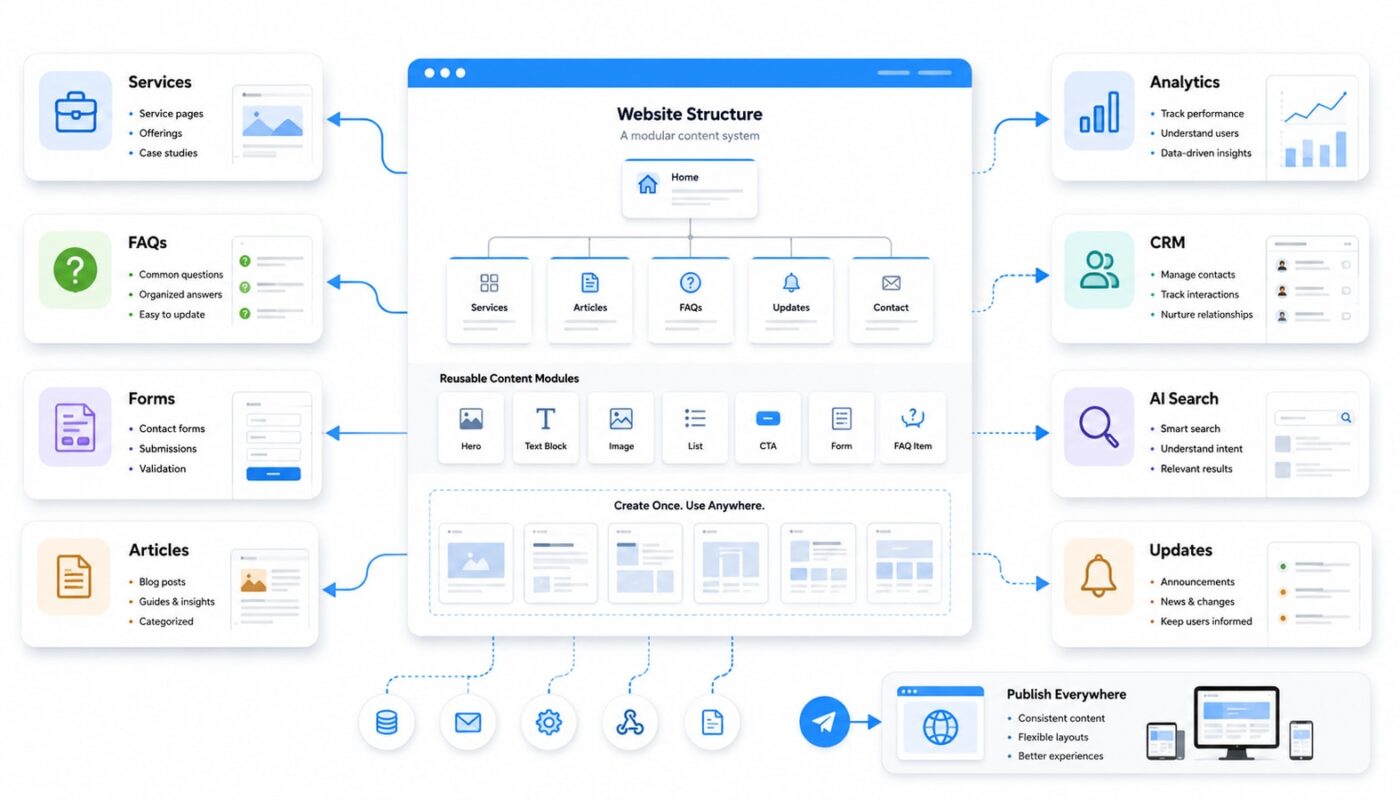
Instead of writing every page as one long custom layout, teams should break content into clear sections: overview, benefits, process, pricing notes, FAQs, testimonials, related services, downloads, forms, and calls to action. These blocks help humans scan faster, but they also help search engines, analytics tools, automation systems, and AI tools interpret the page more accurately.
For example, a service page should not only describe the service in general language. It should clearly define who it is for, what problems it solves, what deliverables are included, what process the business follows, and what action the visitor should take next.
2. Reusable content blocks
Growing teams often repeat the same content across many pages. They reuse service descriptions, team bios, client proof points, pricing explanations, FAQs, and industry summaries. If each item is manually recreated every time, the website becomes difficult to maintain.
A stronger approach is to design reusable content blocks. These can be managed through a CMS, custom fields, content templates, or modular page sections. When content is reusable, teams can update information once and keep the site more consistent across pages.
3. Clear metadata and page relationships
Metadata is not only an SEO task. It is part of digital platform strategy. Page titles, meta descriptions, categories, tags, service relationships, author details, schema markup, image alt text, and internal links all help define what each page means.
When metadata is planned properly, a website becomes easier to search, filter, analyse, recommend, and connect to other tools. A blog article can be linked to a service. A case study can be connected to an industry. A form submission can be routed based on the visitor’s selected need. These small structural decisions make the website more useful over time.
4. Smarter forms and data capture
Many websites still use basic forms that send a plain email to the team. That may work at a small scale, but it becomes inefficient as enquiries increase. An AI-ready website uses forms that capture useful, structured data from the start.
Instead of one general message box, the form can include fields such as service type, budget range, project urgency, company size, preferred contact method, content need, or platform requirement. This improves lead qualification, CRM routing, automation, reporting, and follow-up workflows.
5. Integration-friendly architecture
Website automation workflow depends on clean connections. A website may need to connect with a CRM, email platform, analytics tool, booking system, support desk, LMS, payment gateway, AI assistant, or internal dashboard. If the site is planned only visually, these connections often become messy later.
Teams should plan integrations before redesigning the website. Ask what should happen after a visitor submits a form, downloads a guide, books a consultation, completes a course, signs up for updates, or requests support. The answer should influence the website structure from the beginning.
Practical checklist for planning AI-ready websites
- Map your main content types: services, articles, case studies, resources, FAQs, team profiles, products, forms, and landing pages.
- Define repeatable sections: decide which content blocks should appear across multiple pages so updates stay consistent.
- Improve page hierarchy: make each page easy to scan with clear headings, logical sections, and focused calls to action.
- Plan metadata early: use categories, tags, internal links, alt text, and structured fields with purpose.
- Upgrade forms: collect information that helps your team route, respond, automate, and report more effectively.
- Connect the right systems: identify where website data should go, such as CRM, email marketing, analytics, project management, or support workflows.
- Review content governance: decide who can create, approve, publish, update, and archive website content.
The real design shift
The most important web design trends are not only visual. Yes, websites still need strong layouts, fast performance, accessible design, responsive pages, and good UX. But the deeper shift is operational. Websites are becoming content systems that support business execution.
For teams managing websites and digital platforms, this means every page should be planned with two audiences in mind: the human visitor and the systems that help the business respond, measure, automate, and improve. A beautiful page that cannot be updated, analysed, or connected easily will create friction later.
AI-ready websites give businesses a cleaner foundation for search, publishing, automation, analytics, and future AI tools. The work starts with structure: clearer pages, better content blocks, smarter forms, useful metadata, and practical integrations.
At Digivolve Media, this is how we approach modern web design: not only as a visual project, but as part of a broader digital platform strategy. A stronger website should help teams communicate better, manage content faster, and build workflows that can grow with the business.