Many growing teams start with good intentions. A spreadsheet becomes the marketing plan, a chat group becomes the approval system, a shared calendar becomes the task list, and a publishing app becomes the place where everyone checks what is ready. At first, this feels flexible. Over time, it creates confusion because each tool is being asked to do too many jobs.
The real question is not whether your team needs more software. The better question is what each tool should be responsible for. A clear marketing calendar vs task board decision helps your team separate strategy, ownership, approvals, and publishing so daily content work becomes easier to manage.
Why this matters now
Marketing tools are becoming more automated. Recent developments in AI-assisted campaign troubleshooting, content amplification, and social-to-ad workflows show that platforms are moving toward smarter, more connected marketing operations. That does not remove the need for structure. It makes structure more important.
AI can suggest actions, surface issues, or help move content faster, but it cannot fix a messy content team workflow if no one knows where the plan lives, who owns the next step, or what has actually been approved. Before automation becomes useful, the workflow needs a clear operating model.
The simple rule: one tool, one main job
A marketing calendar, a task board, and a publishing queue should work together, but they should not duplicate each other. Each one answers a different operational question.
- Marketing calendar: What are we communicating, when, and why?
- Task board: Who is doing the work, what stage is it in, and what is blocking progress?
- Publishing queue: What is approved, scheduled, and ready to go live?
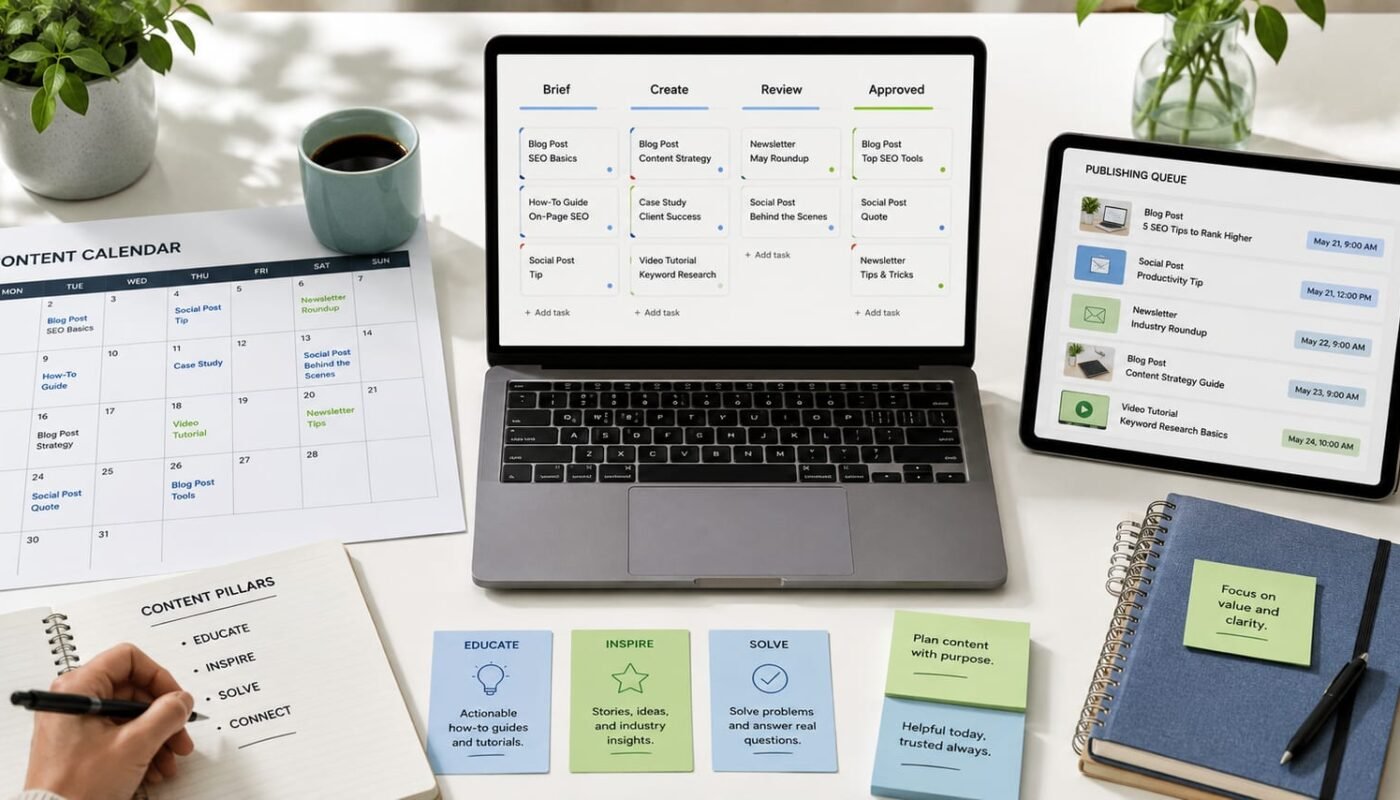
When these roles are separated, your content workflow tools stop competing. The calendar gives direction, the task board manages production, and the publishing queue controls release.
What belongs in the marketing calendar?
The marketing calendar is the planning layer. It should show campaigns, content themes, important dates, platform focus, and business priorities. It is not the best place to manage every small action, file request, or feedback comment.
Use the calendar for monthly planning, campaign timing, product launches, awareness days, content pillars, email dates, social media themes, website updates, and major deadlines. This gives business owners and marketing managers a clear view of the overall plan without drowning them in production detail.
A strong marketing calendar should answer: What needs to be published this week? Which campaign does it support? Which channels are involved? Are we overloading one week and leaving another empty?
What belongs in the task board?
The task board is the production layer. This is where work becomes visible. Every post, video, landing page, email, design request, or content asset should move through clear stages such as Briefed, Drafting, Design, Review, Revision, Approved, and Sent to Queue.
This is where ownership matters. Each task should have one responsible person, a deadline, the current status, required files, and notes from the team. If approvals happen in chat only, feedback gets lost. If progress is tracked only in a calendar, no one can see what is blocked. The task board prevents that.
For a busy content team, the task board should be the daily workspace. Team members should be able to open it in the morning and know exactly what needs attention.
What belongs in the publishing queue?
The publishing queue is the release layer. It should only contain content that has passed review and is ready to schedule or publish. This includes final captions, approved visuals, platform versions, publishing dates, links, hashtags, tracking notes, and any last checks needed before going live.
The queue should not be filled with unfinished ideas or half-approved drafts. When draft work enters the publishing queue too early, teams lose trust in the system. A queue should mean this content is ready, approved, and waiting for its publishing slot.
This separation is especially useful when teams publish across social media, websites, newsletters, ads, and internal platforms. The publishing queue becomes the final checkpoint before content reaches the audience.
A practical workflow your team can use
- Plan in the calendar: Map the month by campaign, theme, channel, and priority.
- Create tasks from the plan: Turn each planned content item into a task with an owner, deadline, and production stage.
- Review inside the task board: Keep comments, edits, files, and approvals connected to the task.
- Move only approved content to the queue: Send final assets and
to the publishing tool once approval is complete. - Report from the published content: Track what went live, what performed, and what should be improved next month.
This structure supports better digital media planning because it gives every stage a home. It also makes automation easier later. For example, a system can notify a designer when a task moves to Design, alert a manager when content is ready for review, or update the publishing queue once approval is marked complete.
Common mistakes to avoid
- Using the calendar as a full project management system.
- Using the task board as a strategic content plan with no monthly view.
- Putting unfinished content into the publishing queue.
- Approving content in chat without updating the task status.
- Creating too many stages that slow the team down.
The goal is not to make the workflow complicated. The goal is to remove uncertainty. Everyone should know where to plan, where to work, where to approve, and where to publish.
How to choose the right setup
Small teams can start with simple tools. A shared calendar, a Kanban-style task board, and a scheduling app may be enough. Larger teams may need a more connected system platform that brings planning, approvals, assets, and reports into one workflow.
The best setup is not always the most advanced one. It is the one your team can follow every day. If people still need to ask where the latest caption is, whether a design was approved, or which post is going live today, the system needs improvement.
At Digivolve Media, we help businesses design clearer digital media workflows, from content planning and publishing structures to websites, systems, automation, and platform strategy. The right workflow does not just organise content. It helps the whole team work with more focus, less confusion, and better control over the brand presence they are building.