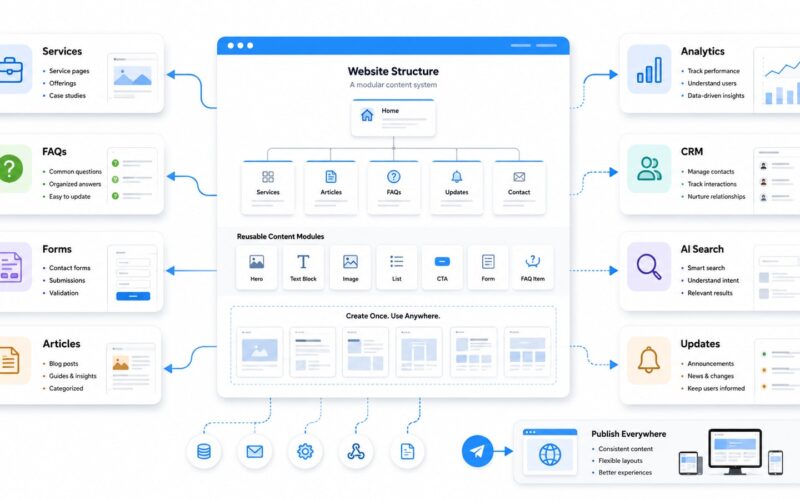
AI and automation can help businesses save time, improve customer service, organise information, and reduce repetitive manual work. But many business owners make the same mistake: they start by comparing tools before they understand what needs to be automated. The result is often another subscription, another dashboard, and another system that the team does not fully use.
A strong AI automation readiness checklist helps you prepare before choosing platforms. It gives your team a clearer view of your content, customer journey, website, CRM, approvals, data, and daily operations. This preparation is what turns automation from a trend into a useful part of your digital media strategy.
1. Clarify the business problem before choosing the tool
Start with the problem, not the software. AI tools for business can support many areas, including admin, marketing, customer support, reporting, document processing, content planning, finance tasks, and internal communication. But a tool is only useful when it solves a clearly defined business need.
Before you test any platform, write down the top three problems your team wants to fix. For example, your team may be spending too much time replying to repeated enquiries, manually updating spreadsheets, chasing content approvals, or moving customer details between systems. These are practical automation opportunities.
Checklist
- List the repetitive tasks that take the most time each week.
- Identify where errors, delays, or duplicated work happen most often.
- Separate tasks that need human judgement from tasks that can follow a clear process.
- Choose one priority workflow to improve first instead of automating everything at once.
2. Map your current workflow honestly
Automation preparation starts with understanding how work actually happens. Many businesses have informal processes hidden in email threads, WhatsApp messages, spreadsheets, shared folders, and staff memory. If the workflow is unclear, automation will only make confusion move faster.
Map the current process step by step. For example, if you want to automate website enquiries, document what happens from the moment a customer fills in a form to the moment someone follows up. Who receives the message? Where is it saved? Who responds? What information is missing? What happens if nobody replies?
Checklist
- Write the beginning and end point of each workflow.
- List every step, approval, handover, and tool involved.
- Identify who is responsible at each stage.
- Mark the steps that are slow, repeated, or easy to forget.
- Decide what should happen automatically and what still needs human review.
3. Organise your content and media assets
AI and automation work better when your content is structured. If your business information is scattered across old presentations, outdated website pages, social media captions, PDF brochures, image folders, and staff notes, it becomes harder to build reliable workflows.
For marketing and digital media teams, this is especially important. AI workflow planning should include your service descriptions, brand messaging, FAQs, product details, case studies, visual assets, video files, blog posts, proposal templates, and approved brand language. These materials help automation tools produce more consistent outputs and support better customer communication.
Checklist
- Create one organised folder for approved brand and content assets.
- Update service descriptions, product information, pricing notes, and FAQs.
- Remove outdated logos, old templates, and duplicated files.
- Label content by purpose, such as website, sales, social media, support, proposals, and onboarding.
- Prepare reusable answers for common customer questions.
4. Clean up your customer data and CRM process
Automation depends on reliable data. If customer details are incomplete, duplicated, outdated, or stored in too many places, your automation may send the wrong message, miss an important lead, or create extra admin for your team.
Before choosing a CRM automation tool, decide what information you need to collect from customers and where that information should live. This may include name, email, phone number, service interest, enquiry source, project status, assigned team member, follow-up date, and notes from previous conversations.
Checklist
- Decide which customer fields are essential.
- Remove duplicate contacts where possible.
- Standardise lead stages such as new enquiry, contacted, quoted, approved, active, completed, and follow-up.
- Connect website forms to the correct destination.
- Define who owns each customer follow-up step.
5. Review your website as part of the automation system
Your website should not be treated as a separate brochure. For many businesses, it is the starting point for enquiries, bookings, downloads, content discovery, support requests, and CRM activity. A website that is poorly structured will limit what your automation can do.
Review your pages, forms, calls to action, analytics, and integrations. Make sure each important page has a clear purpose. A service page should guide visitors towards the next action. A contact form should collect the right information. A blog article should support search, education, and lead nurturing. This is where digital media strategy connects with AI workflow planning.
Checklist
- Check whether your main pages are updated and easy to understand.
- Review all forms and remove unnecessary fields.
- Make sure form submissions go to the right person or system.
- Add clear calls to action on key pages.
- Track important actions such as enquiries, downloads, bookings, and newsletter sign-ups.
6. Define approval rules before automation goes live
Not every automated action should happen without review. Some tasks can be fully automated, while others need approval from a manager, owner, or specialist. This is especially important for public content, customer messages, pricing, legal information, financial tasks, and brand communication.
A practical business automation checklist should define where human approval is required. For example, AI may help draft a social media caption, but a human should approve it before publishing. A system may generate a quotation reminder, but pricing changes may need review.
Checklist
- Mark which tasks can be automated safely.
- Mark which tasks need human approval before sending or publishing.
- Create approval steps for marketing content, customer messages, quotes, and reports.
- Assign backup reviewers when the main person is unavailable.
- Keep a record of important automated actions.
7. Prepare your team roles and training plan
AI and automation are not only technology decisions. They affect how people work. Your team needs to know which tools to use, what the new process is, what they are responsible for, and when they should step in.
Start with a simple learning plan. Train your team on the specific workflows they will use first, rather than overwhelming them with every AI feature available. A deliberate rollout helps people understand the purpose of the system and reduces resistance.
Checklist
- Choose one person to own each automated workflow.
- Create short internal instructions for the new process.
- Train staff on what the automation does and does not do.
- Explain when to override, pause, or report an issue.
- Review the workflow after the first few weeks and improve it.
8. Choose tools only after the foundation is clear
Once your workflows, content, data, approvals, and team roles are organised, choosing tools becomes easier. You can compare platforms based on what your business actually needs instead of chasing the longest feature list.
Look for tools that fit your current systems, support your priority workflow, integrate with your website or CRM, protect your data, and are simple enough for your team to maintain. The best automation tool is not always the most advanced one. It is the one your business can use consistently and improve over time.
Final takeaway
The most important part of AI automation readiness is preparation. Organise the work first, then choose the tools. Businesses that prepare their content, customer data, website, approvals, and team responsibilities are more likely to build automation that saves time and supports growth.
Digivolve Media helps businesses plan and build practical digital systems across websites, content workflows, CRM, automation, AI, and digital media strategy. If your business is exploring automation, the right starting point is not a tool list. It is a clear map of how your business should work.