Before and After AI Lead Handling: A Checklist to Fix Missed Enquiries and Slow Follow-Ups
Most businesses do not lose leads because nobody cares. They lose them because enquiries arrive in too many places, the next step is unclear, and follow-up depends on whoever happens to see the message first. A form submission lands in email. A WhatsApp enquiry goes to one phone. A social media message is noticed later. A website chat starts well but is never moved into a proper sales or admin process.
This is where an AI lead handling checklist becomes useful. Not as a shiny AI experiment, but as a practical way to make enquiry handling faster, more consistent, and easier to manage. Recent automation developments across business platforms show a clear direction: companies are moving away from disconnected manual work and toward connected workflows that organise data, trigger reminders, and support better decisions. The lesson for small businesses is simple. AI works best when it is built into a clear process, not added as another tool for the team to babysit.
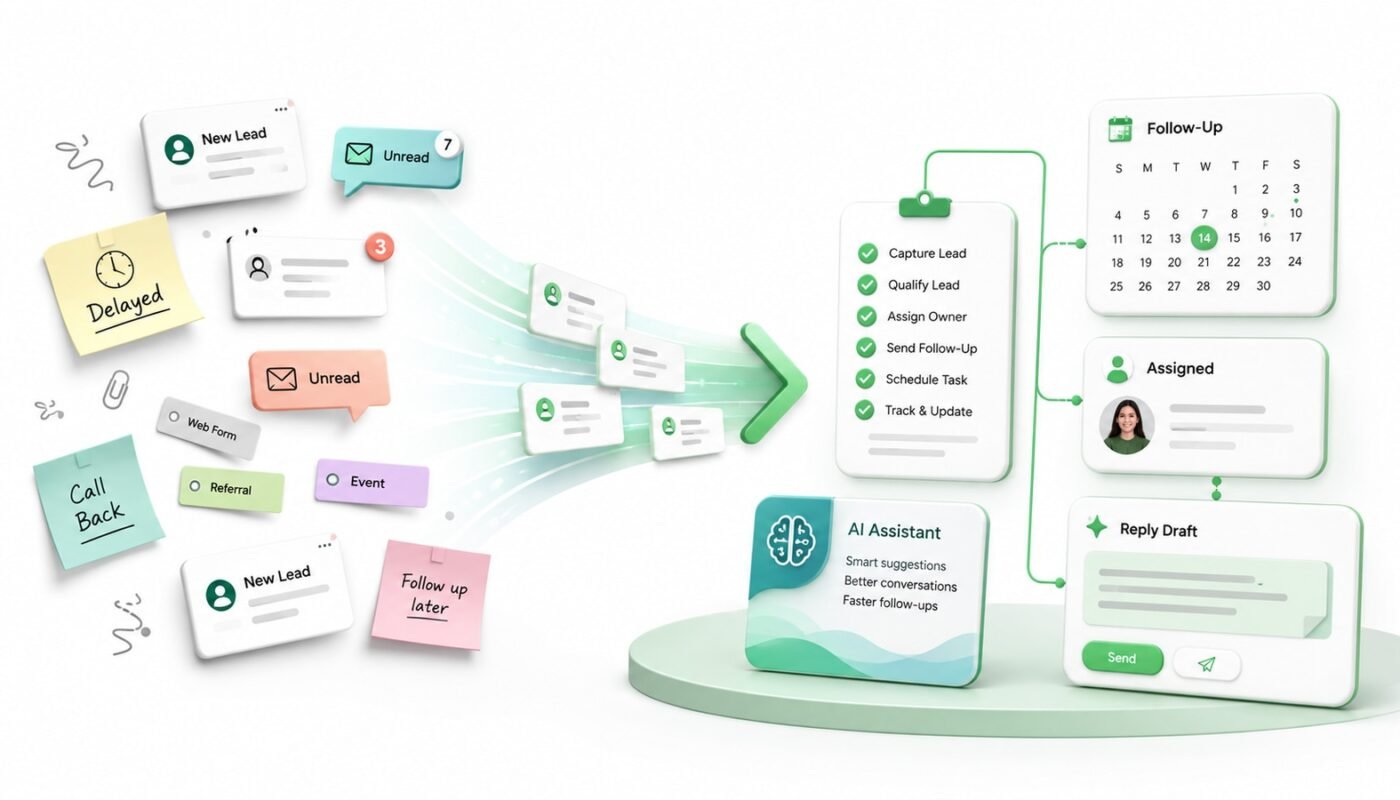
The before state: where leads usually get lost
Before automation, lead handling often looks busy but unreliable. The team may be responding to messages, but there is no single view of who enquired, what they need, how urgent they are, and who owns the next action.
- Enquiries arrive from website forms, email, WhatsApp, social media, calls, and referrals.
- Important details are missing, such as service type, budget range, deadline, location, or decision-maker name.
- Follow-ups rely on memory, sticky notes, inbox flags, or manual calendar reminders.
- Every team member replies in a slightly different tone or with different information.
- Hot leads are treated the same as low-priority enquiries.
- Managers only realise a lead was missed after the client has moved on.
The problem is not only speed. It is consistency. A slow reply can hurt trust, but an unclear reply can do the same. If a client has to repeat themselves or wait for basic next steps, the business already feels less organised.
The after state: what good AI lead handling should create
After a proper AI follow-up workflow is in place, the goal is not to remove people from client communication. The goal is to remove the avoidable admin around it. The team should still make decisions, build relationships, and close work. AI and automation should handle capture, structure, routing, reminders, and first-draft support.
A better workflow might look like this: every enquiry enters one system, key details are extracted, the lead is tagged by service and urgency, the correct person is notified, a suitable response draft is prepared, and a follow-up reminder is created automatically. The business now has a visible process instead of scattered messages.
The AI lead handling checklist
Use this checklist before buying another CRM, chatbot, or automation platform. It helps you design the workflow first, then choose the right tools.
- Map every enquiry source. List all places where leads arrive: website forms, landing pages, WhatsApp, email, Instagram, Facebook, LinkedIn, phone calls, Google Business Profile, referrals, and event contacts. If a channel is not mapped, it cannot be managed properly.
- Define the minimum lead information. Decide what your team needs before they can respond well. This may include name, contact details, company, service interest, project type, urgency, budget range, preferred contact method, and message summary.
- Create one lead intake format. Whether the enquiry starts as a form, email, or message, convert it into one standard structure. This makes business enquiry automation easier because every lead can be sorted, assigned, and tracked in the same way.
- Set lead categories. Group enquiries by service, such as website design, automation, video, photography, branding, or platform support. For other businesses, categories may be product enquiries, bookings, consultations, support requests, or quote requests.
- Score urgency simply. Do not overcomplicate lead scoring at the beginning. Use practical levels such as urgent, warm, general, and not suitable. AI can help detect urgency from words like deadline, launch, quotation, problem, broken, today, or ready to start.
- Assign ownership immediately. Every lead should have one responsible person or team. A lead without an owner is a lead waiting to be missed. Automation can route website enquiries to sales, technical requests to support, and campaign enquiries to marketing.
- Prepare response templates with room for personalisation. An AI assistant for leads can draft replies, but your templates should guide tone, structure, and next steps. Include greeting, acknowledgement, summary of need, suggested next action, and expected response time.
- Automate follow-up reminders. A good client communication automation system should create reminders when there is no reply after a set time. For example, follow up after 24 hours for hot leads, three days for warm leads, and seven days for longer decision cycles.
- Track status clearly. Use simple stages such as new enquiry, replied, meeting booked, quote sent, waiting for client, won, lost, and nurture. This gives the team a shared view without needing a complicated sales operation.
- Add human review where it matters. AI should not send sensitive, high-value, or complex replies without review. Use AI to prepare the draft and organise the information, then let a person approve important communication.
A practical example
Before automation, a business receives a website enquiry asking for help with a new booking system. The email goes to a shared inbox. Someone replies two days later asking for more details. The client responds, but the message is missed during a busy week. No follow-up is created.
After automation, the same enquiry is captured from the website form, tagged as a system platform lead, summarised by AI, assigned to the right person, and added to a follow-up workflow. The team receives a notification with the client’s need, suggested next questions, and a draft reply. If there is no response after the first message, a reminder is created automatically. Nothing depends on memory.
What to avoid when adding AI
The biggest mistake is using AI as a loose assistant instead of building it into a workflow. This creates extra checking, repeated prompting, and more admin. AI should reduce friction, not create a second layer of work. Start with one lead process, test it, improve it, and only then expand it to more channels.
Also avoid over-automation. Not every enquiry needs a long AI analysis. Sometimes the best workflow is simple: capture the lead, classify it, send a clear acknowledgement, notify the right person, and schedule a follow-up.
Final thought
Good AI lead handling is not about replacing your team. It is about giving your team a reliable system for responding faster, communicating clearly, and protecting opportunities from slipping through the cracks. Digivolve Media helps businesses plan and build practical AI automation, websites, systems, and content workflows that connect digital enquiries to real business action.